

Blender摄像机自动对焦插件Autofocus Pro V0.0.9使用教程与功能介绍
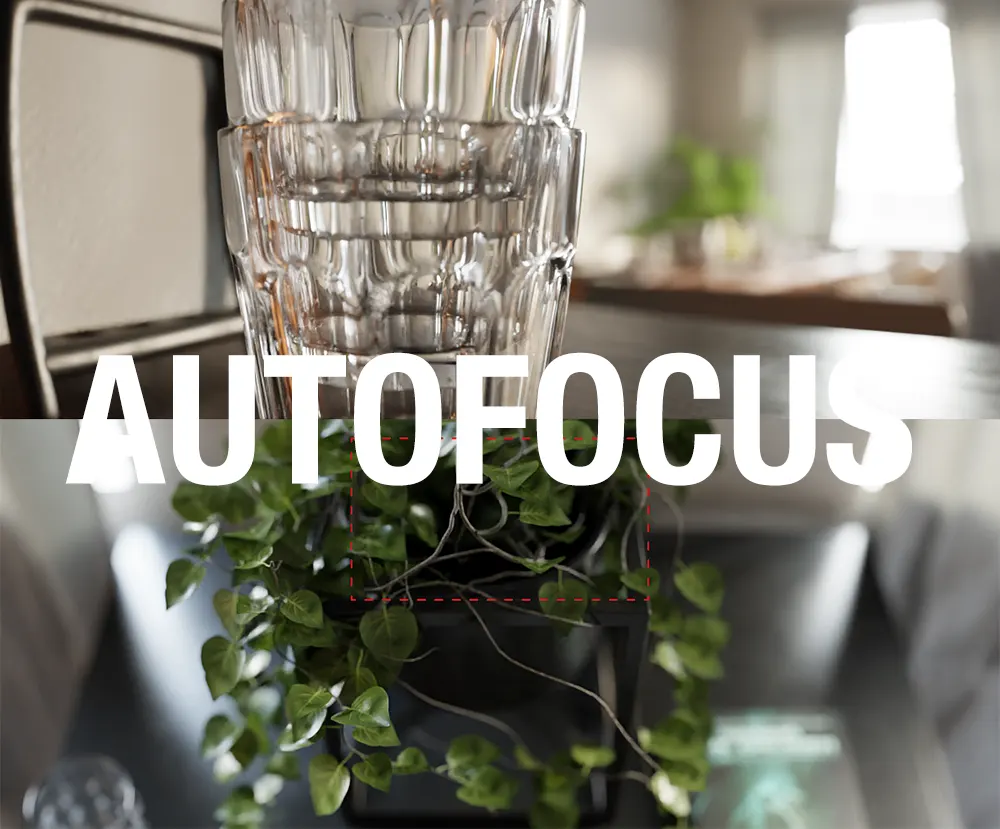
Autofocus Pro 是一款专为 Blender 摄像机景深与自动对焦控制设计的实用插件,它可以帮助用户像操作真实摄影机一样,在三维场景中快速、精准地完成焦点控制。无论你是在制作静帧渲染、产品展示、短片动画,还是复杂的镜头运动场景,这款插件都能显著提升对焦效率,让你把更多时间放在画面表现和动画创作本身,而不是反复手动调整焦距。
在 Blender 默认工作流程中,如果想要制作景深效果,往往需要手动输入对焦距离,或者指定某个物体作为焦点目标。但 Blender 的原生对焦方式通常是针对物体原点,而不是物体表面,这在近景镜头、浅景深镜头或焦点变化频繁的动画中会带来明显误差。尤其当镜头前有多个物体移动、角色进出画面、或者需要在不同主体间进行自然的“拉焦”切换时,传统方法不仅繁琐,而且很难获得真实摄影机那种平滑、自然的对焦效果。
Autofocus Pro 的核心优势就在于:它能够像真实相机一样,根据画面中的内容自动判断焦点位置,并一键完成对焦。 用户无需提前创建空物体,也不必手动逐帧调节焦距,只需简单操作,就可以让摄像机自动把焦点锁定到你希望的位置。插件支持在画面中心对焦,也支持在左三分、右三分等常用构图区域中智能寻找主体。如果默认区域不能满足需求,用户还可以自定义对焦区域,像绘制一个框选区域一样,自由指定摄像机应该关注画面的哪一部分,从而实现更精准、更符合镜头语言的对焦控制。
除了“对哪里对焦”之外,Autofocus Pro 还很好地解决了“如何对焦更自然”的问题。真实世界中的摄影机并不会瞬间完成对焦,而是会根据镜头系统的特性产生轻微延迟或平滑过渡。该插件提供了灵活的对焦速度控制,你可以让它快速锁定主体,以适应运动节奏较快的镜头,也可以模拟真实摄影机缓慢、顺滑的拉焦效果,使焦点在不同主体之间自然过渡,避免焦点突兀跳动,提升画面的电影感和专业感。
对于动画项目而言,Autofocus Pro 的另一个强大之处是:它不仅能对单帧生效,还能自动处理整段动画的每一帧。 当场景中有大量物体进出画面,或者摄影机本身在持续移动时,插件可以自动分析每一帧的焦点位置,并将对焦变化烘焙成关键帧。这意味着无论是短镜头还是长时间动画,你都可以快速完成一整段自动对焦流程,而不用耗费大量时间手动布置空物体和设置关键帧。
在性能方面,Autofocus Pro 也进行了较好的优化。对于普通场景,它可以在极短时间内完成整段动画的自动对焦计算;而面对复杂场景时,插件也通过高效的算法减少等待时间。新版功能中还加入了可视化烘焙进度、支持中途按 Esc 取消处理、避免 Blender 在烘焙时“假死”等体验优化,让实际使用更加稳定流畅。
功能层面上,Autofocus Pro 也在不断增强。例如它支持单帧精准对焦,非常适合静帧渲染和海报图制作;支持跳帧对焦,可以在长动画中按每隔 n 帧计算一次焦点,从而显著提升处理速度;支持背景距离控制,避免天空盒或远处背景干扰焦点判断;新增的对焦策略允许用户选择优先对焦最近的一小部分射线命中对象,从而实现更贴近拍摄需求的结果。较新的版本还加入了 Prioritise Object Hits(优先物体命中) 功能,可以在检测到物体时忽略背景,防止焦点错误落到主体后方;同时提供 Ignore Collections(忽略集合) 选项,让你排除不希望参与对焦计算的物体,例如透明玻璃、辅助模型或隐藏结构件。
此外,插件还支持与 Lens Sim 的兼容,可对模拟镜头进行自动对焦烘焙、单帧精准对焦以及关键帧删除等操作。新版还增加了 Realtime Focus(实时对焦预览) 功能,用户在正式烘焙前,就能直接在视口中预览焦点变化效果,这对于镜头检查和参数调整非常有帮助。
从兼容性来看,Autofocus Pro 已支持多个 Blender 版本,包括 3.5、4.0、4.1、4.2、4.4 等,并持续更新。对于需要高质量景深、自动拉焦和更高镜头控制效率的 Blender 用户来说,这款插件可以说是一个非常实用且专业的工具。它不仅提升了景深镜头制作效率,也让 Blender 中的摄像机表现更接近真实影视摄影工作流,是动画创作者、视觉设计师和 CG 艺术家提升作品质感的有力助手。
To upgrade from Autofocus Core to Auofocus Pro, Blender Market should automatically give you a discount based on what you've spent previously. If you have any issues upgrading just send me a message :)
Automatically focus your scenes in 1 click
Autofocus Pro (previously known as aperture) makes it a breeze to add a depth of field to your scenes, by working like a real camera to automatically focus where you want, giving you more time to create beautiful animations.
It's the complete solution for applying autofocus to any of your scenes, allowing you to:
Focus your Blender camera in a single click
Autofocus anywhere in your frame
Focus quickly for fast moving scenes, or slowly, like a real camera. It's up to you
Let's face it, focusing in Blender used to be a chore
If you'd like to add some depth of field to your Blender scene, your choices are limited. You can dial this in manually, which might work for very simple scenes with no movement, but even then you'll have to spend time tweaking to get the focusing plane exactly right.
You can pick an object to focus on, but Blender will actually focus on the origin of the object, and not the surface. So, for objects which are close to the camera, or when you are using a very narrow depth of field, the focus will be noticeably off. Never mind if you want to change focus between objects.
The third option, which is the only real option for complex scenes with movement, is to focus on an empty, and manually keyframe this to move where you want your focus to be. But for this to work effectively, you need to insert multiple keyframes, which is time-consuming and might lead to inconsistent or unrealistic focusing speed between each change in focus.
Now, you can apply autofocus to your scenes quickly and effortlessly, with a single click
Add autofocus to your scenes in a single click. It's that simple. No need to create empties where you want to focus, or spend time tweaking the focus distance until it's exactly where you want. Click one button to intelligently focus the camera.
Benefit #1 - Focus Anywhere in your Scene
The wide range of built in focus regions means that you can instantly focus on your subject, whether it is in the center, left third, or moving through a large part of your scene. But if you need something more bespoke, you can create your own custom focusing region as easily as you can draw a bounding box.
Benefit #2 - Don't let your Focus Point Jump Around
Real cameras don't instantly know where to focus, and you can achieve realistic, smooth, focus pulls using Autofocus Pro's intuitive settings. Or, depending on your scene, you can use Autofocus Pro's diverse range of other features while focusing instantly on the subject at hand.
Benefit #3 - Don't Just Focus on One Frame, Focus on Every Frame
Lots of objects moving in and out of frame? No problem. Autofocus Pro will pull focus for every frame, and keyframe this movement for you. This means that no matter whether you are working on a short clip, or a feature length animation, Autofocus Pro has you covered.
Benefit #4 - Apply Depth of Field to your Scenes in Seconds
In testing, Autofocus Pro applied autofocus to low memory scenes in under a second for the whole animation. Even highly complex scenes apply autofocus quickly by utilizing efficient, optimised code.
But why do I need a plug-in?
You might have seen techniques that show you ways to achieve autofocus inside Blender without a plug-in. But they have some important limitations which Autofocus Pro solves.
Existing techniques only work with ONE OBJECT. Autofocus Pro sees your entire scene just like a physical camera, and can focus on any object, even when you pan to a different part of your see.
With Autofocus Pro, you're not limited to focusing in the exact center, like other techniques. If the wide-range of focus regions isn't enough, you can draw your own and focus exactly where you want to in the scene.
Autofocus Pro allows you to pull focus smoothly, using a variety of settings. This replicates a real focusing camera, which doesn't react instantaneously.
Autofocus Pro works with a single click. No need to tediously set up shrinkwrap modifiers for every new scene where you want to apply autofocus.
Lifetime access and all future updates included for free
For this one-time purchase, receive lifetime access to the script, as well as access to all future updates. No tiers, no optional upgrades, get all the convenient features above for the same great price. Amazing value for anyone looking to level up their Blender animation game.
Changelog
5/8/2024:
Renamed panels in line with blender conventions to suppress warnings in console.
New "Probe Focus Distance" feature tells you where the optimal focus distance would be for the current frame, without changing focus.
Fix bug in "Perfectly Focus Frame", which would mistakenly call "Bake Autofocus" on the whole animation.
Fix bug where "Bake Autofocus" only progresses while mouse is moving.
Improve in-plugin documentation.
Now officially supports 4.0, 4.1 and 4.2.
28/5/2023:
Baking autofocus no longer makes Blender unresponsive.
Baking autofocus visualises which frame it's working on, so you can see progress.
Baking autofocus is cancellable by pressing "escape" during focus.
Now officially supports 3.5.
Clicking "stop showing focus region" disables render region - preventing accidentally rendering only part of the scene that you were focusing on.
Refactored focusing engine.
Delete focus keyframes for your current camera at the press of a button (for pro only).
Improved UI for Advanced Settings menu.
1/10/2022 - Tested to work with Blender 3.3. 4 powerful new features:
Focus perfectly on a single frame rather than an entire animation - great for stills.
Skip frames. Long, complex animations can take too long to focus, because blender needs to load all frames before they can be focused. Now you can only focus on every n frames, for an approximately n x speed up in complex scenes.
Control the background distance. Parts of your view where the background is visible with no objects are seen as very far away, which can throw your focus distance. Now you can decrease this distance, so background is seen however you want it to be.
New focus strategies - now focus on the closest 1% or closest 5% of rays cast.
13/4/2025 - Tested to work with Blender 4.4.
Compatibility with Lens Sim - bake autofocus, perfectly focus frame, delete keyframes, for emulated lenses.
Blender 4.4 compatibility.
Add “prioritise object hits” setting, to ignore background when objects are detected. Prevents focusing behind objects.
Add “ignore collections” - objects that are ignored by the plugin, for example if there are invisible objects or glass objects you don’t want to focus on.
GUI Improvements.
Fix bug with left thirds and right thirds focus regions.
21/4/25 - Add realtime focus
Pro version gets "Realtime Focus" to preview focus in the viewport before baking
Decouple version number from Blender versions. Previously, for example, Autofocus Pro 4.4 was intended for Blender 4.4. However the latest Autofocus Pro release, 5.0, separates the two numbers.
支持的Blender版本:
4.4, 4.3, 4.2, 4.1, 4.0, 3.5, 3.4, 3.3, 3.2, 3.0, 2.93, 2.92, 2.91, 2.83
安装步骤:
Blender 4或者低版本
在顶部菜单编辑(Edit)-偏好设置(Preference)-插件(Add-ons)-安装(Install),弹窗里选择auto_focus_pro_4_4.py安装
Blender 4.1或者高版本
在顶部菜单编辑(Edit)-偏好设置(Preference)-插件(Add-ons),右上角下拉,选择从磁盘安装,弹窗里选择auto_focus_pro_4_4.py安装
-
 插件脚本/骨骼绑定 2026-08-14
Pose to Rest Pose插件下载|Blender姿态转静息姿态插件|Blender形态键保持插件|一键应用姿态为静息姿态|Blender骨骼绑定工具
在Blender三维角色动画工作流中,将当前姿态固化为新的静息姿态(Rest Pose)是一项常见但操作繁琐的需求。无论是为游戏引擎导出优化后的基础姿态、重新定义角色绑定的中性位置,还是为后续动画制作建立更合理的起始基准,传统方法都面临一个棘手的矛盾:直接使用Blender内置的“Apply Pose as Rest Pose”功能虽然能快速完成姿态转换,却会不可避免地破坏或丢失网格对象上精心设置的形态键(Shape Key)数据以及关联的驱动器(Driver)系统。对于依赖...
-

Pose as Rest Pose v1.3.0:Blender姿态烘焙与重设休息姿态的专业解决方案Pose as Rest Pose v1.3.0 是一款专为Blender动画师和角色绑定师打造的高效插件,旨在解决角色动画制作中一个长期存在的核心痛点:如何将当前摆好的姿态安全、准确地应用为新的休息姿态,同时不破坏已有的形态键、修改器链和骨骼绑定结构。该插件历经多个版本迭代,在v1.3中引入了大量生产级的安全保障机制,使其从简单的“一键重置”工具升级为具备预检校验、数据备份、...
-

在三维内容创作领域,尤其是建筑可视化和室内设计行业,将一张平面草图或CAD图纸转化为精细的3D室内空间,往往意味着漫长且枯燥的重复劳动。手动勾勒每一面墙壁、逐个挤出结构、为门窗切割洞口,再调整无数个细小的尺寸参数——这不仅耗时巨大,还极易消磨创意灵感。正是为了彻底解决这一痛点,专为Blender生态打造的划时代工具——Procedural Interiors应运而生。它不仅仅是一个简单的建模辅助脚本,而是一套完整的程序化室内生成解决方案,旨在将设计师从繁琐的基础构建中彻底解放...
-
 插件脚本/系统辅助 2026-08-14
Engon – Blender开源智能资产浏览器插件,一站式3D资产管理与加速工作流
Engon 是一款专为 Blender 打造的完全开源、免费且智能的资产浏览器插件,由深耕 Blender 生态多年的 polygoniq 团队研发。它并非简单的文件管理器,而是一套完整、连贯且经过严格质量把控的 3D 资产中枢系统。Engon 支持通过 GitHub 自动更新,并且完全离线可用,这意味着无论你身处何地,都能快速访问和管理数千个高质量模型、材质、纹理、场景预设、几何节点组以及渲染设置。其核心设计理念是“让创作更快捷,让过程更愉悦”——通过统一的数据结构和标签体...