

Pose to Rest Pose插件下载|Blender姿态转静息姿态插件|Blender形态键保持插件|一键应用姿态为静息姿态|Blender骨骼绑定工具

在Blender三维角色动画工作流中,将当前姿态固化为新的静息姿态(Rest Pose)是一项常见但操作繁琐的需求。无论是为游戏引擎导出优化后的基础姿态、重新定义角色绑定的中性位置,还是为后续动画制作建立更合理的起始基准,传统方法都面临一个棘手的矛盾:直接使用Blender内置的“Apply Pose as Rest Pose”功能虽然能快速完成姿态转换,却会不可避免地破坏或丢失网格对象上精心设置的形态键(Shape Key)数据以及关联的驱动器(Driver)系统。对于依赖面部表情系统、肌肉形变修正或程序化动画控制的专业项目而言,这种数据丢失往往是不可接受的。Pose to Rest Pose插件正是为彻底解决这一痛点而诞生。该插件以一键化操作为核心理念,将当前姿态应用为静息姿态的完整流程封装为一个高度智能化的处理管线,同时完整保留所有形态键及其附属属性——包括形态键数值、滑块范围、静音状态和自定义属性——并且自动维护形态键上的驱动器系统,甚至在驱动器表达式中存在指向形态键自身的引用时也能正确更新引用路径。插件深度集成于Blender的Pose菜单中,用户无需离开熟悉的操作界面即可完成全部工作,极大提升了角色绑定调整阶段的工作效率与数据安全性。
从技术实现角度来看,Pose to Rest Pose插件借鉴并集成了开源项目SKkeeper经过验证的形态键处理算法,其核心流程设计精妙且稳健。当用户触发操作后,插件首先会自动检测场景中所有通过Armature修改器绑定到目标骨架的网格对象——这一检测范围不仅限于当前场景,而是覆盖整个Blender文件中所有场景,确保不会遗漏任何受该骨架影响的网格。对于每一个检测到的网格,插件会为每个形态键创建临时副本,然后在当前姿态下应用Armature修改器,再将临时副本中的形态键数据精确转移回基础网格,整个过程中形态键的所有属性、数值范围、静音状态及自定义属性均被原样保留。对于形态键上存在的驱动器,插件会自动识别并保存驱动器的表达式和变量配置,在形态键转移完成后恢复所有驱动器关系,尤其针对驱动器中自引用形态键数据路径的情况进行了专门处理,确保驱动器指向的ID引用在数据转移后依然有效。此外,插件具备完善的多网格支持能力,同一骨架驱动的所有网格对象(如身体、服装、配饰等分离模型)均会在单次操作中被统一处理,避免重复劳动。在安装方面,插件支持Blender 4.2及以上版本,用户可通过Blender的扩展仓库系统直接添加远程仓库地址进行在线安装,操作门槛极低;对于仍在使用Blender 3.6至4.1版本的用户,官方提供了v0.3.0作为最终兼容的旧版方案。插件的使用限制也经过了清晰界定:每个目标骨架在网格上仅应存在一个Armature修改器;修改器堆栈顺序建议将Armature修改器置于其他变形修改器之前,以避免顶点数量不匹配导致的形态键转移失败;共享网格数据的对象(如通过Alt+D复制产生的实例)需要先执行“Make Single User”操作转为独立数据;形态键上的关键帧动画数据、Action以及NLA条目不在此插件的保留范围内,建议在创建形态键动画之前完成姿态转换操作;Armature修改器本身上附加的自定义属性也不会被保留,但标准修改器设置如保持体积、顶点组绑定、堆栈位置等均会完整恢复。插件采用GPL v3开源许可证发布,个人与商业项目均可免费使用,代码中使用的形态键处理算法源自Johannes Rauch开发的SKkeeper项目,体现了开源社区技术共享与协作的精神。
Pose to Rest Pose
A Blender addon for applying the current pose as rest pose while preserving shape keys and drivers with a single click.
Features
- One-Click Operation: Apply current pose as rest pose directly from the Pose menu
- Shape Key Preservation: Maintains all shape keys including values, slider ranges, mute states, and custom properties
- Driver Support: Preserves shape key drivers and automatically updates self-references
- Multi-Mesh Support: Handles multiple meshes affected by the same armature
Installation
1. Open Blender's "Edit" → "Preferences" → "Get Extensions"
2. Open "Repositories" → click "+" → "Add Remote Repository"
3. Enter the URL: `https://kxn4t.github.io/blender-extensions/index.json`
4. Search for "Pose to Rest Pose" and install
Usage
Basic Usage
1. Select your armature and enter Pose Mode
2. Position your armature in the desired pose
3. Go to Pose > Apply > Apply Current Pose as Rest Pose
The addon will automatically:
- Detect all meshes with Armature modifiers targeting the selected armature, including those in other scenes
- Preserve all shape keys and their properties
- Apply the current pose to the armature's rest position
- Restore all modifiers and drivers
Technical Details
Shape Key Processing
This addon uses algorithms from [SKkeeper](https://github.com/smokejohn/SKkeeper) to:
- Create temporary copies of each shape key
- Apply the armature modifier with the current pose
- Transfer shape keys back to the base mesh
- Maintain all shape key properties and relationships
Driver Handling
- Automatically detects existing drivers on shape keys
- Preserves driver expressions and variables
- Restores driver relationships, including self-references to shape key data
Requirements
Blender 4.2.0 or higher
> Note: For Blender 3.6–4.1, please use [v0.3.0](https://github.com/kxn4t/pose-to-rest-pose/releases/tag/v0.3.0) (final legacy version).
- Meshes must have only one Armature modifier per target armature
Limitations & Best Practices
Modifier Order
For optimal results, ensure proper modifier order:
- ✅ Recommended: Armature Modifier → Other Deformation Modifiers
- ❌ Not Recommended: Deformation Modifiers → Armature Modifier
Deformation modifiers (Displace, Wave, Shrinkwrap, etc.) placed before the Armature modifier may cause vertex count mismatches during shape key transfer.
Modifiers that may change vertex count should also be handled with care.
Shared Mesh Data
- Objects with shared (linked) mesh data are not supported. If multiple objects share the same mesh (e.g., created with Alt+D), you will be prompted to make them single-user first (Object > Relations > Make Single User > Object & Data).
Scene Scope
- The addon processes all meshes across all scenes that reference the target armature, since `pose.armature_apply()` modifies the armature data block itself
Not Preserved
The following data is not preserved by this addon:
- Shape key animation data: Keyframes, Actions, and NLA strips on shape keys are not transferred. Apply this addon before creating shape key animations.
- Armature modifier custom properties: Custom properties added to the Armature modifier itself will be lost. Standard modifier settings (preserve volume, vertex group, stack position, etc.) are restored.
-

Pose as Rest Pose v1.3.0:Blender姿态烘焙与重设休息姿态的专业解决方案Pose as Rest Pose v1.3.0 是一款专为Blender动画师和角色绑定师打造的高效插件,旨在解决角色动画制作中一个长期存在的核心痛点:如何将当前摆好的姿态安全、准确地应用为新的休息姿态,同时不破坏已有的形态键、修改器链和骨骼绑定结构。该插件历经多个版本迭代,在v1.3中引入了大量生产级的安全保障机制,使其从简单的“一键重置”工具升级为具备预检校验、数据备份、...
-

在三维内容创作领域,尤其是建筑可视化和室内设计行业,将一张平面草图或CAD图纸转化为精细的3D室内空间,往往意味着漫长且枯燥的重复劳动。手动勾勒每一面墙壁、逐个挤出结构、为门窗切割洞口,再调整无数个细小的尺寸参数——这不仅耗时巨大,还极易消磨创意灵感。正是为了彻底解决这一痛点,专为Blender生态打造的划时代工具——Procedural Interiors应运而生。它不仅仅是一个简单的建模辅助脚本,而是一套完整的程序化室内生成解决方案,旨在将设计师从繁琐的基础构建中彻底解放...
-
 插件脚本/系统辅助 2026-08-14
Engon – Blender开源智能资产浏览器插件,一站式3D资产管理与加速工作流
Engon 是一款专为 Blender 打造的完全开源、免费且智能的资产浏览器插件,由深耕 Blender 生态多年的 polygoniq 团队研发。它并非简单的文件管理器,而是一套完整、连贯且经过严格质量把控的 3D 资产中枢系统。Engon 支持通过 GitHub 自动更新,并且完全离线可用,这意味着无论你身处何地,都能快速访问和管理数千个高质量模型、材质、纹理、场景预设、几何节点组以及渲染设置。其核心设计理念是“让创作更快捷,让过程更愉悦”——通过统一的数据结构和标签体...
-
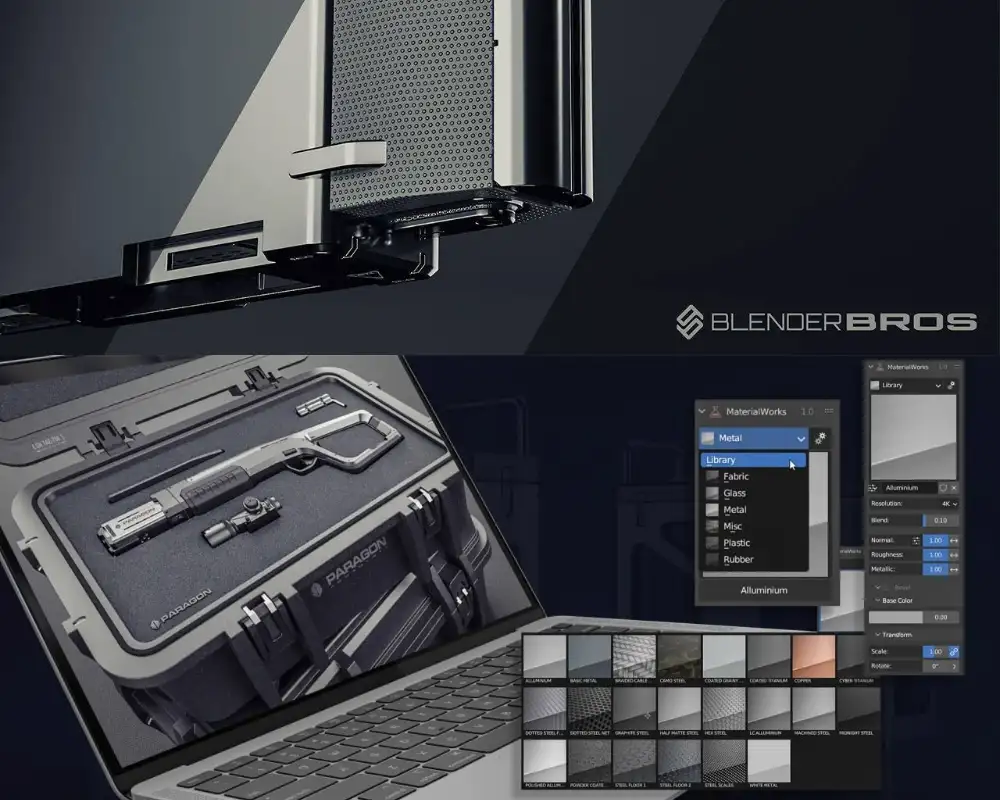
MaterialWorks 2.0:Blender材质与纹理插件终极解决方案——一键实现照片级真实感渲染在三维创作领域,材质与纹理的真实感塑造始终是决定作品质量的关键环节。然而,传统的Blender工作流往往迫使艺术家陷入复杂的节点编辑、繁琐的UV展开以及多软件协同的困境之中。MaterialWorks 2.0的诞生,彻底颠覆了这一现状——这款由专业硬表面艺术家与纹理设计师联合打造的Blender插件,以“一键式”操作哲学为核心,将超过2100万种细节排列组合、860余种贴花...